Business Central Extensions: The Good Stuff That Makes ERP Actually Work for Humans

In IT, sometimes it really does just need turning off and on again. We could make a big fuss about it, vanish for an hour, and come back with a bill for a “system power‑cycle”… but we’d rather just tell you the truth and save everyone the hassle.
That same mindset is exactly how we approach Microsoft Dynamics 365 Business Central: use standard functionality first, then fill the gaps with proven marketplace apps, and only then—if there genuinely isn’t another way—look at development (built to modern standards so upgrades stay painless).
Business Central can scale from “finance system with a few users” all the way up to “multi‑site beast” territory—manufacturing, warehousing, POS, projects, service management, the lot. But every business is nuanced, and the common mistake is not spending enough time understanding what you actually need.
So let’s talk extensions: what’s out there, what’s worth it, and a recent real‑world example where we implemented Insight Works Graphical Scheduler and Lanham Associates EDI for a client.
What “Extensions” Actually Mean in Business Central
Extensions (apps) are add‑ons that expand Business Central without hacking the core product. Done right, they:
improve user experience,
automate integrations,
add industry‑specific capability,
and keep you upgrade‑safe.
And because we don’t reinvent the wheel, we look at apps early—because the marketplace is full of solutions that are better tested (and better supported) than bespoke code for the same outcome.
The Main Types of Business Central Extensions (and why you’d use them)
1) Manufacturing & Shop Floor Visibility
You can run manufacturing in standard Business Central, but many teams hit a practical wall: the data is there, but it isn’t visible enough for real‑world scheduling decisions.
This is where scheduling/visualisation tools come in—especially for work centres and machine centres.

2) Supply Chain Integration (EDI, shipping, labels, scanning)
If you trade with larger customers (or major distributors), EDI quickly becomes mandatory. The wrong approach to EDI creates manual work, compliance failures, and painful chargebacks.
Good EDI tooling keeps the work inside Business Central so your team isn’t living in portals and spreadsheets.
3) Warehousing & Barcode Scanning
Anything that cuts errors in picking, receiving, serial tracking, and bin movement tends to pay for itself quickly—especially in busy environments.
4) Document Capture, Workflow & Finance Automation
Approvals, invoice capture, OCR, document routing, expense claims—these are “small” improvements that save big time.
5) Reporting, BI & “Stop Asking Finance for That Spreadsheet”
Yes, Business Central has reporting. No, that doesn’t mean your stakeholders will stop asking for better insight. Extensions often bridge the gap between operational reporting and decision‑ready dashboards.
A Recent Example: Production Scheduling + EDI Compliance (Without the Drama)
We recently helped a client with two common challenges:
Production scheduling worked… but wasn’t visible.
Customer trading required EDI, and manual processing was eating time and creating risk.
So we implemented two apps that are designed for exactly those outcomes.
Insight Works Graphical Scheduler: Visual Scheduling That Makes Sense
Graphical Scheduler (by Insight Works) is built to help you visualise what’s scheduled at each workstation, and it supports drag‑and‑drop style interaction for rescheduling operations. [marketplac...rosoft.com]
It also supports configurable Views, where a view defines what data is displayed and includes default time scales (e.g., week/month, day/week, hour/day). That matters because different roles need different visibility—planners often want weeks, supervisors often want days, and the shop floor usually wants “what’s next.” (That last bit is us speaking from experience, not a product claim.) [kb.dmsiworks.com]
Why it helped our client (in plain English):
Scheduling conversations became visual (“here’s the bottleneck”) rather than interpretive (“I think we’re loaded next week”).
Rescheduling stopped being a multi‑page treasure hunt.
The team had a shared picture of work centre load.
And importantly, this aligns perfectly with our delivery rule: standard first, then apps, then development.
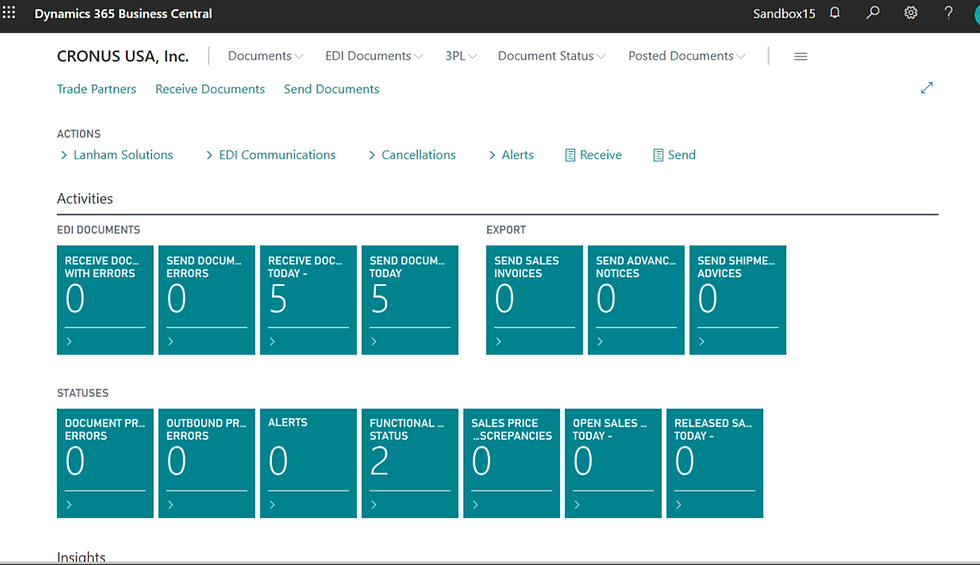
Lanham Associates EDI: Trading Partner Compliance Inside Business Central
Lanham’s EDI approach is built around keeping mapping and cross‑reference functions inside Business Central, tying EDI documents to the related Business Central transactions (orders with orders, invoices with invoices). [lanhamassoc.com], [lanhamassoc.com]
The marketplace listing also positions it explicitly as managing trading partner compliance inside Business Central, with mapping/cross‑reference inside the system. [marketplac...rosoft.com]
Why that matters: your customer service team shouldn’t need to become EDI file archaeologists.
Our Take: Extensions Should Reduce Noise, Not Add It
We’re not here to sell you shiny objects. We’re here to make Business Central work properly for your business—everything that goes on top of it, around it, or integrates with it—done well and at a reasonable value‑for‑money price.
And a big part of that is helping your team become independent. Our philosophy is to share knowledge so you’re not forever dependent on consultants to operate your own system.
If you’re looking at Business Central extensions and want a sane second opinion, we’re happy to help you sort:
what you can do standard,
what’s best handled by a marketplace app,
and what (if anything) needs development.
Quick FAQ
What are Business Central extensions?
Extensions are add‑on apps that extend Business Central functionality without modifying the core product, helping you stay upgrade‑safe.
What is Insight Works Graphical Scheduler?
A scheduling app that helps visualise workstation schedules and supports drag‑and‑drop style scheduling interaction, with configurable Views and time scales. [marketplac...rosoft.com], [kb.dmsiworks.com]
What does Lanham EDI do for Business Central?
Lanham EDI manages trading partner compliance inside Business Central, tying EDI documents to related transactions and supporting automated send/receive processing. [marketplac...rosoft.com], [lanhamassoc.com], [lanhamassoc.com]


Comments